Skills are the New Source Code: Building Agentic Coot
Preamble: What is Structural Biology?
You might like to think of it as 3D bioinformatics where the scientist/experimenter created the sample and collected and processed their own data.
Structural Biology has been a recurring theme in the award of Nobel Prizes:
- 2003 Chemistry Roderick MacKinnon Ion Channels: Elucidated the structural basis for how potassium ions move through cell membranes.
- 2006 Chemistry Roger D. Kornberg Transcription: Visualized the atomic structure of RNA polymerase at work (the “DNA reader”).
- 2009 Chemistry Ramakrishnan, Steitz, & Yonath The Ribosome: Mapped the structure of the ribosome, the cell’s protein factory, at the atomic level.
- 2012 Chemistry Robert Lefkowitz & Brian Kobilka GPCRs: Mapped G-protein-coupled receptors, which are responsible for how cells sense hormones and light.
- 2017 Nobel Prize in Chemistry: Jacques Dubochet, Joachim Frank, and Richard Henderson: Developments in Electron cryo-microscopy
Preamble: What is Coot?
Coot is a foundational tool in Structural Biology used worldwide for the interpretation of electron density maps using x-ray data and electron cryo-microscopy images. It is used for validation, model-building, refinement and analysis. It is used by the pharmaceutical industry and biotech particularly in the modelling and validation of ligands (drug-like molecules).
All of the above Nobel Prize winners have cited Coot.
I am the author of Coot and have been developing it for over 20 years.
Introduction
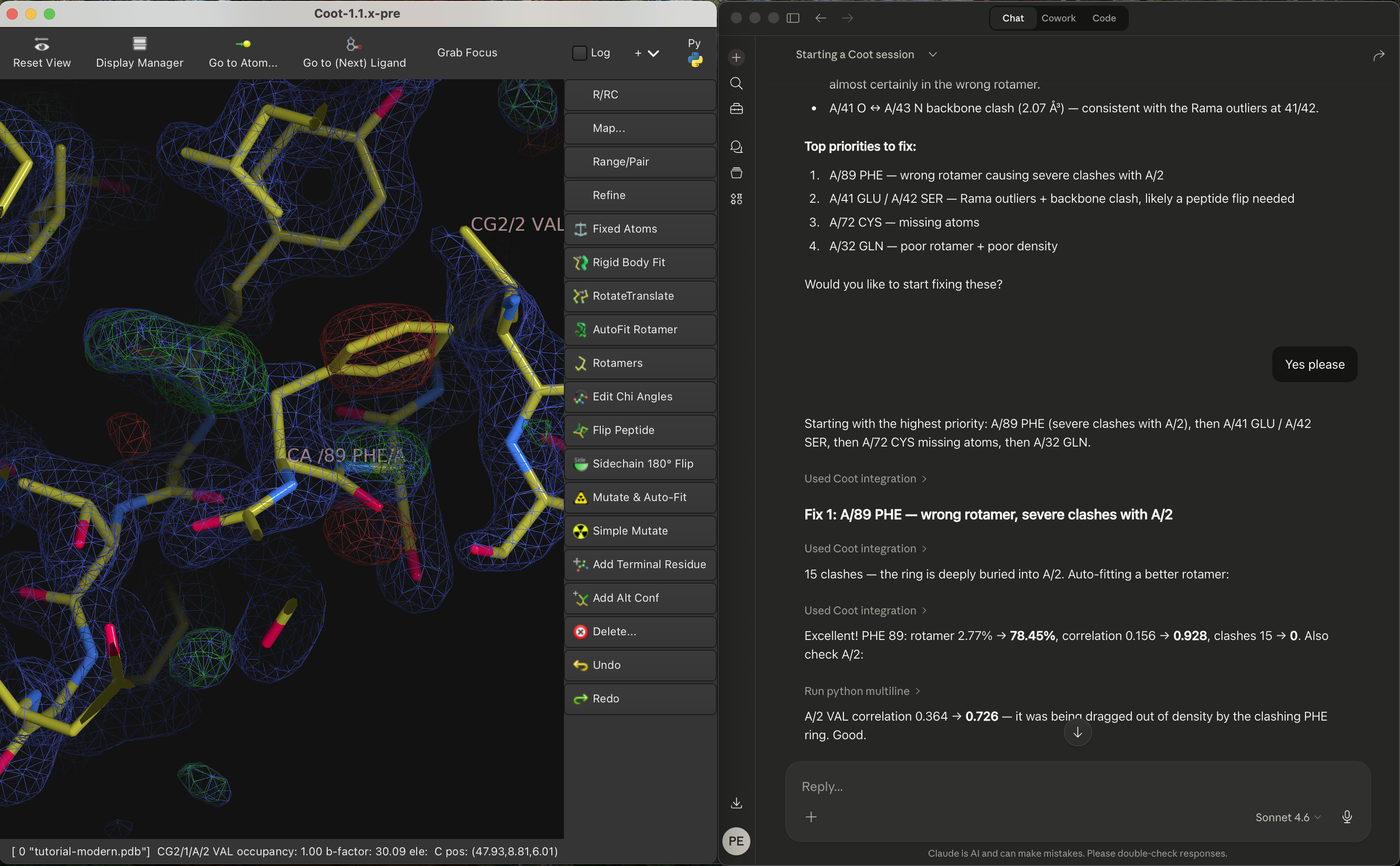
Seeing that the molecular graphics program ChimeraX could be used with MCP [1], I was intrigued to see if I could make Coot work with an MCP.
A typical approach is that taken by the PyMOL [2] MCP [3] where the work to create the interface is built into the bridge itself - there are no additional capabilities.
Coot already had a rich Python API and it turned out that there was actually little I needed to do to make an MCP bridge other than expose the Python API.
So… what did I need to do to make Agentic Coot?
The MCP and Running Python Code
The first thing to do then was to repair/replace the ancient “server” that Coot had with a robust JSON-RPC that communicates over sockets.
That took a few days of iteration:
-
The messages needed to be framed (both ways), where the message is prefixed by a 4-byte big-endian integer representing the size of the message
-
Multi-line code blocks needed to be handled. I addressed this by telling Claude (in a SKILL.md) that if a return value was needed, then the function should wrap a multi-line code block in a function as one operation, and then call that function to receive a return value in another.
-
Fragile (badly-formatted) JSON needed to be handled with try/catch (discovered by trying to communicate with Claude and Coot in Russian)
-
I saw that Claude was often using
print()for variables even though I had told Claude that there was no access to stdout. I tried various ways to stop Claude trying to useprint()but without much success, so I changed tack and wondered if I could actually capture the stdout from running python code and feed that back to Claude. Turns out I could and, we managed to get that working - but only after quite a few iterations. -
Claude often tried to run code that was syntactically erroneous, e.g. making up functions that didn’t exist or calling functions with the wrong parameters (or even calling Coot code that was broken). These code fragments were generating errors in the log, but the errors were not being fed back to Claude.
So I reworked the python-running code once more to capture Python errors and send them back - stack trace included. Claude was happy about that.
-
Initially, Claude tried to communicate with Coot in one-liners, then as the API documentation was added, Claude used blocks of 5 or 6 lines (very typically with print() statements). Later on, when the Skills were developed and, we were working on “real” instructions (for example “Validate the ‘A’ chain”) Claude was writing big blocks of code and getting large responses. The communication both to and from Coot, via the socket became bigger than the buffer. This crashed Coot because I had used json.parse() without exception protection and the partial message caused json.parse() to throw an exception. I obviously needed to move the json.parse() call into a try/catch block and also accumulate the incoming message (rather than presume it was all there in 4Kb buffer).
-
The current implementation of the Python-running code is
execute_python_code_with_result_internal()andexecute_python_multiline_code_with_result_internal()insrc/c-interface.ccThe JSON-RPC code has its own file
src/json-rpc.cc -
This is a “high-trust” interface. Claude has the ability, in principle, to write a python script that deletes the file-system. There are specific instructions not to use os.remove() or os.system(). I don’t believe that it would do that, so I am fine with it (you may not be, of course). The communication is localhost only.
Converting the Documentation
- C++-header → Doxygen → XML → function-docs.i → SWIG → Python
__doc__
Once I had wired up Claude to Coot it was able to run Coot’s Python functions. It was very soon evident that Claude didn’t know what it was doing - very frequently guessing at commands. I didn’t know why, so I asked. Claude told me that this was because it didn’t actually know how to use the API. Claude only had the function signatures to go by and therefore didn’t know what the arguments meant or what the return value meant.
So I needed to give it more information about the API. We had already faced a similar problem with chapi [4] - and had reworked the C++ header documentation so that it was added to the nanobind information and was thus made available when programming in Python with an LSP. This involved using Doxygen to parse the headers and a custom XML→Python script (that I described previously [5]).
I reworked that script so that the output was suitable for SWIG (which is the API wrapper that Coot uses). This produces the .i files that are “%include”d in the coot.i SWIG input file.
For example:
%feature("docstring") get_symmetry followed by a full description
of the function, its arguments and return value. Such documentation
is now in place for thousands of functions - with more in the works.
OK! So now we have 10Mb of API documentation. Great!
Actually, not so great. As soon as I was able to do so, I fed the whole now fully-documented Coot API to Claude in the bridge tools function list_available_tools(). Claude immediately stopped speaking to me. The problem now was that I had exhausted my token budget. Claude can only read a fraction of the API documentation before the token limit is smashed.
Handling the Token Limit
The solution was to
- provide a hand-crafted set of basic or common functions for which documentation should be read at start-up
- provide a mechanism to search the API
- augment the above with Skills (more on that below)
The search function compared the search pattern with Coot’s function names and the function documentation to the search term provided by Claude. I asked Claude if logical “or” and logical “and” operators would be useful in the search text. Claude said that it would, so I added those too.
Once this startup choreography was clarified, I could start making progress on detailing the skills.
Modelling Infrastructure
Prior to this work, Coot had an “undo” function that was both invoked by a GUI button press and was scriptable. This was fine for interactive use, as the user was looking at the modifications as they were being backed out.
This was not good enough for Claude though. In order to experiment
with different model-building techniques to resolve an issue, Claude
needed to make checkpoints so that it could backtrack to the original
model. So I implemented make_backup_checkpoint() and
restore_to_backup_checkpoint(). In addition, Claude wanted a method
to see what had changed as a result of its operations - so I added
compare_current_model_to_backup().
Now Claude has the infrastructure to test various methods of solving a model-building problem.
What is “Agentic”?
I understand that the meaning of the word is still fluid. Basically though, it means moving beyond merely following instructions - there is some degree of “now think for yourself” and folded in with that is an ability to review what it has done and correct it if needed (often via an alternative approach).
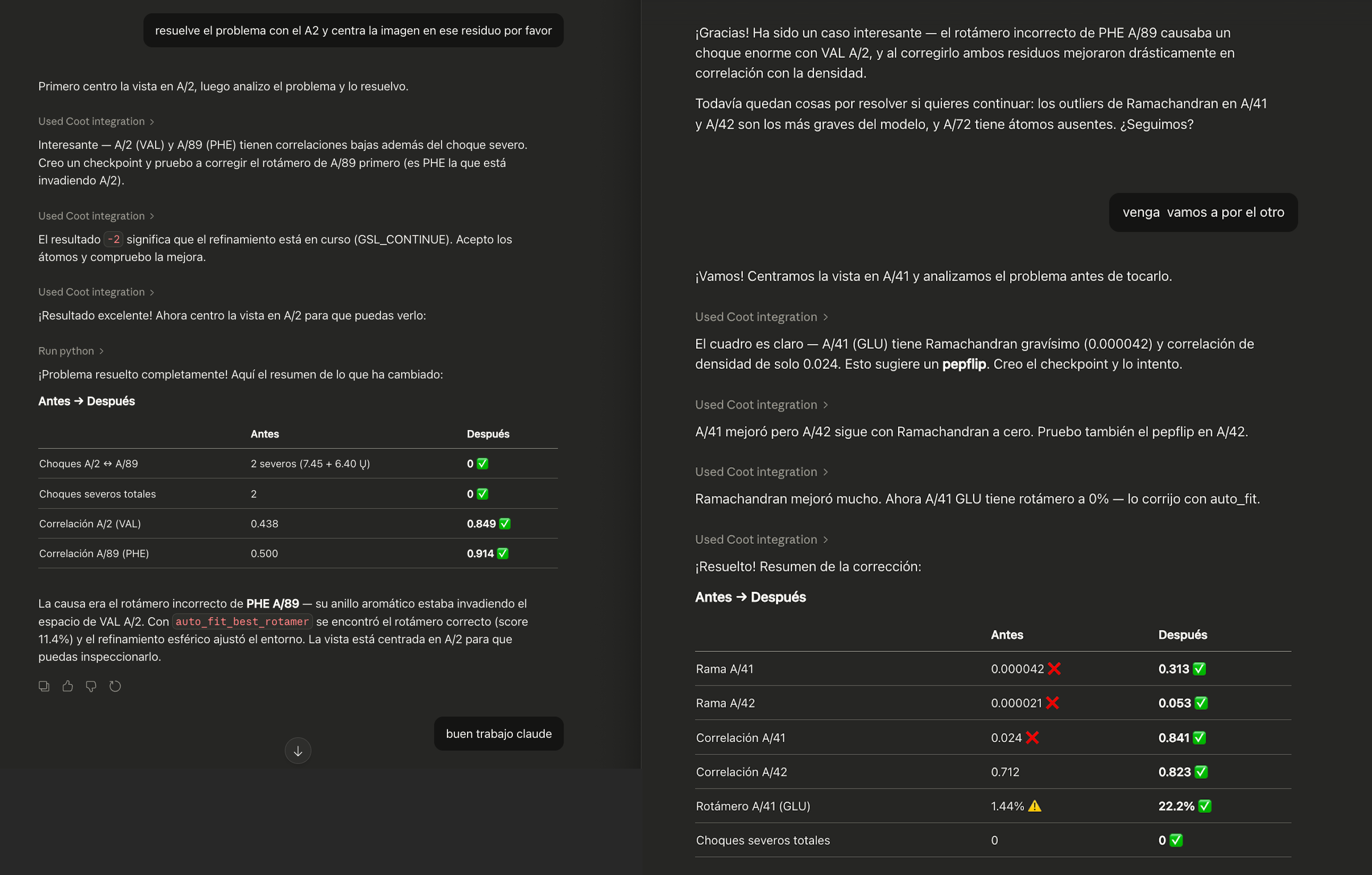
In the case of Coot, it means that “fix the model errors in this structure” will have a meaningful response. A non-Agentic interface would be to calculate a Ramachandran plot, a rotamer analysis, an atom overlap analysis, and from that find what is wrong and then after looking at it, fix the issue using the (user-determined) appropriate tool(s).
How Does This Work Make Coot Agentic?
In the skills, I have told Claude to check the rotamers, Ramachandran, density fit and atom clashes before and after making changes to the model - so that it can decide if the change was in the right direction. The checkpoints allow it to do back-tracking if (when!) needed.
So, after a “Validate this chain” instruction, it will provide a comprehensive validation and then ask “Do you want me to fix the problems?” - this is what makes the interface “agentic.”
How I worked with Claude
- I used Claude Desktop entirely (i.e. not Claude.ai or Claude Code)
- There was a lot of “OK, try it again” i.e. sticking points:
- Python return values and stdout capture
- Converting and propagating the C++ header documentation so that Claude understood what the function does and its arguments and return value
- Implementation of Checkpoints
- Synchronous refinement (this was simply broken in Coot and had been for years)
- There were several times when I had to adjust the documentation for the function or update the return value or type to improve the richness of the feedback
- After the infrastructure was in place, the actual process of using
Coot was very similar to what you’d expect from sitting with a
PhD student in a one-on-one and teaching them Coot by working
through the Coot tutorial. There were a couple of differences:
- I was typing, not speaking
- Instead of pointing at the screen saying “look at that” I was telling Claude to run various functions and look at the table of numbers that it returned.
Making Skills
After such a session I asked Claude to digest the conversation and write it up as a Skill in Markdown. I edited the file, corrected it (and in some cases corrected Claude’s misunderstanding and told it to make an update) or quite frequently Claude offered to make the update itself.
There have been several sessions now, covering basic usage,
validation, blobs, model-building and refinement. The resulting
SKILL.md files are in the mcp/docs/skills directory in the coot git
repo.
I have slowed down on the creation of skills now. Mostly now I (and Claude) are making smaller edits. The ability of Claude to map from intent (in any language) to the specifics of the Coot API is considerably enhanced by using synonyms in the documentation.
How It Felt
I had had no experience with Claude before this work.
-
Working with Claude to develop Agentic Coot felt like working with a fast, eager/impatient, but ignorant PhD student. Claude’s main role was first to tell me what was needed to use the API properly and then to review our conversations (which consisted of many “no, don’t do that, do this”) and turn them into Markdown documents (skills).
-
There were a few occasions where I did ask it to write code though. Claude created blocks of code about 10 lines or fewer (e.g. PyErr_Fetch()) for handling the Python run-time errors, I didn’t know how to do this and I let Claude suggest the code block. Likewise, I let Claude add a patch for the buffer accumulation when reading the incoming Python commands.
-
While the skills were still in development, or not even read on startup, it seemed that Claude was clutching at straws - making up searches in a desperate (and usually doomed) attempt to find the right function to perform the task. Very frequently I was pressing the “Stop” button and saying “You’re going down the wrong path!” and then asking why a particular function was used (rather than the one I wanted to be used). OK… so rework the documentation, change of emphasis - and try again.
-
Claude Sonnet’s tone changed over the weeks. The enthusiasm for wins (getting features working) reduced, and the professionalism increased. This is a result of the ever-increasing volume, sophistication and accuracy of the Skills. Once these were in place, Claude no longer celebrated the successes (e.g. the ability to read detailed function documentation).
-
What perhaps I have not yet made apparent is just how fun this has been! I was getting Claude to write prose and then using that document as source code so that Claude learnt from my skills and experience. I was programming the LLM, but just through documentation.
-
Working with Claude driving Coot was sooooo much more enjoyable than poring my way through the Python C-API documentation for error handling.
What Does it Look Like?
Agentic Coot demo video on YouTube
Why are Skills the New Source Code?
After the infrastructure (particularly the python responses and the check-pointing, and the updated documentation) was in place we could get on to actual model-building problems and how to solve them.
-
Frequently I was asking: “What do you need to know that what you just did was a mistake?”
-
At the end of a session, I would say “Digest the model-building operations in this session and write it up in Markdown”
Then open a new chat and do the same thing. This was useful to find errors and confusions. These were addressed by refining the wording of the skills. Now there are over 6000 lines of skills documentation. But here though, no programming knowledge is needed - just domain knowledge.
Claude turns the documented expertise into Python scripts. Usable by anyone in any language.
What Does this mean for Other Scientific Software?
It seems that the pattern established here is portable to other applications. Scientific software that has a rich API (and not necessarily Pythonic) could follow a similar path.
Skills are now not just for personal use or by developers for developers. Skills can be written by domain experts (or even those with some experience) for users (scientists at any skill level) worldwide.
Once a robust MCP bridge is in place and a JSON-RPC server for it to communicate with, it is now possible for domain experts to communicate with it to produce otherwise exquisitely difficult to obtain detailed and elaborate problem analysis and workflow - recorded in Markdown files!
“So How Do I Get It Working for Me?”
- Get the mcp bridge https://github.com/pemsley/coot/blob/main/mcp/coot_mcp_socket_bridge.py
- Install it in your connectors:
- On Mac:
in
~/Library/Application Support/Claude/claude_desktop_config.json - On Linux:
in
~/.config/Claude/claude_desktop_config.json - It will be something like this:
{
  "mcpServers": {
"Coot": {
  "command": "python",
  "args": [
 "/Users/paulemsley/Projects/coot-mcp/coot_mcp_socket_bridge.py"
  ]
}
  }
}
(where the
pythonthat runs the bridge has installed FastMCP (pythonis Python3, of course).)
- On Mac:
in
-
Download the Skills from the subdirectories in the skills directory and install them into Claude using Customize → Skills → “+”
- Start a new Claude session and say: “Start a Coot session.” That will trigger Claude to use the Coot MCP and read the startup instructions, which means that Claude will
- Ping Coot
- Read the Skills
- Read the Essential API
It may take a minute or so.
-
Then you are are good to go!
- If you wish to just see what it can do, you can start with “Load the tutorial model and data”
Caveat
I have not tried this with any other LLM than Claude.
I intend to try with Qwen 3 or Llama 4 - because the market (such as it is) for this will probably be with Open models.
Implementation Details
I did most of this work with
- Sonnet 4.5 and more recently using Opus 4.5
- using nlohmann’s JSON parser
- Neovim 0.11.4 with Tree-sitter and LSP
Extra Reading
Acknowledgements
I was inspired by Alexis Rohou’s work with MCP and ChimeraX and by Martin Noble’s Claude enthusiasm to buy a Claude subscription for myself shortly before Christmas 2025.
References
[2] PyMOL https://www.pymol.org/
[3] PyMOL MCP https://github.com/vrtejus/pymol-mcp
[4] https://www2.mrc-lmb.cam.ac.uk/personal/pemsley/coot/docs/api/html/ https://www.mrc-lmb.cam.ac.uk/lucrezia/libcootapi-documentation/
[5] https://pemsley.github.io/coot/blog/2024/10/31/doxygen-to-pydoc.html